
Libreswan配置(h3c g3路由器 - 服务器)
很久没有更新了,更新一个比较小众的ipsec配置:
服务器内网网段和企业内部有重复,需要配置另一个ip来连接ipsec
以下配置171.223.209.162所在端为H3C ER3260G3,101.126.18.176所在端为远程 服务器。
快速方案:使用预共享密钥(PSK)
一、 配置 H3C ER3260G3
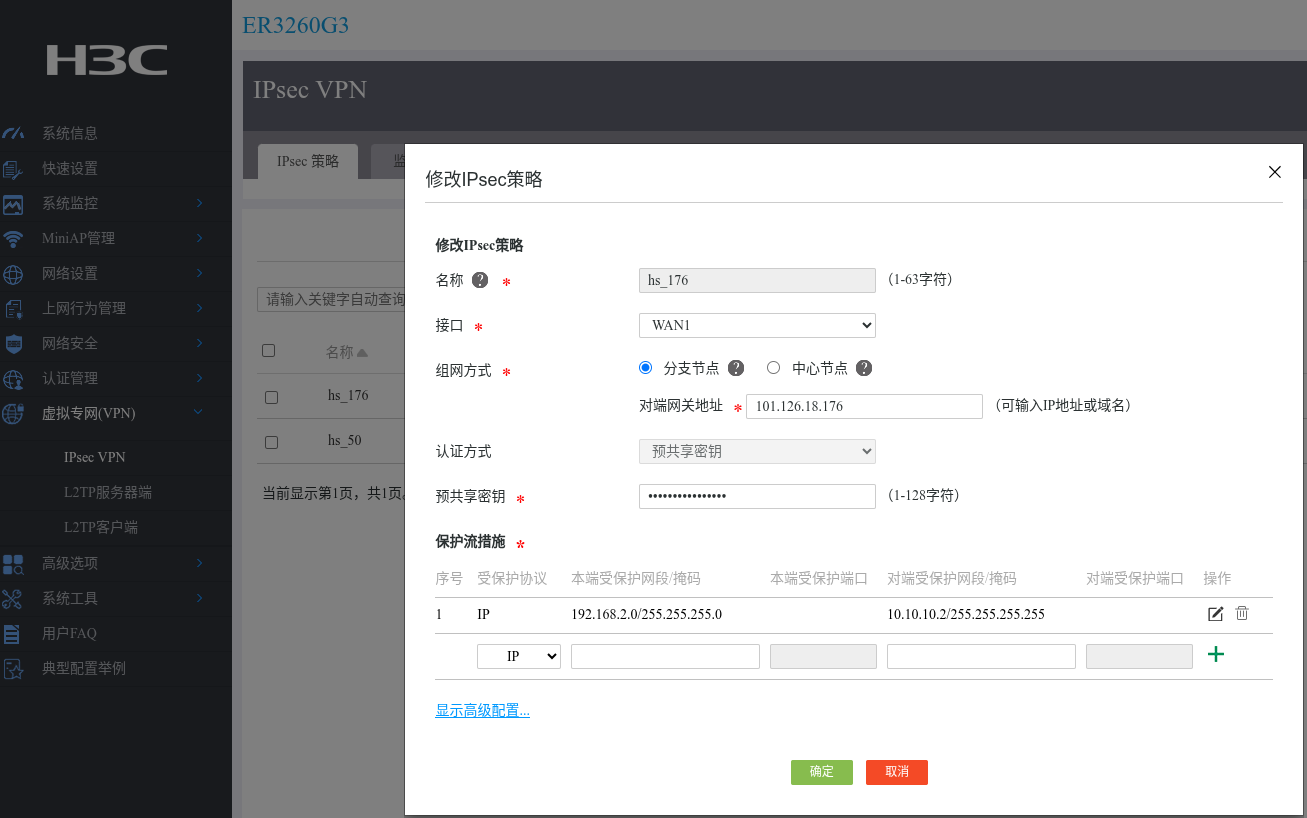
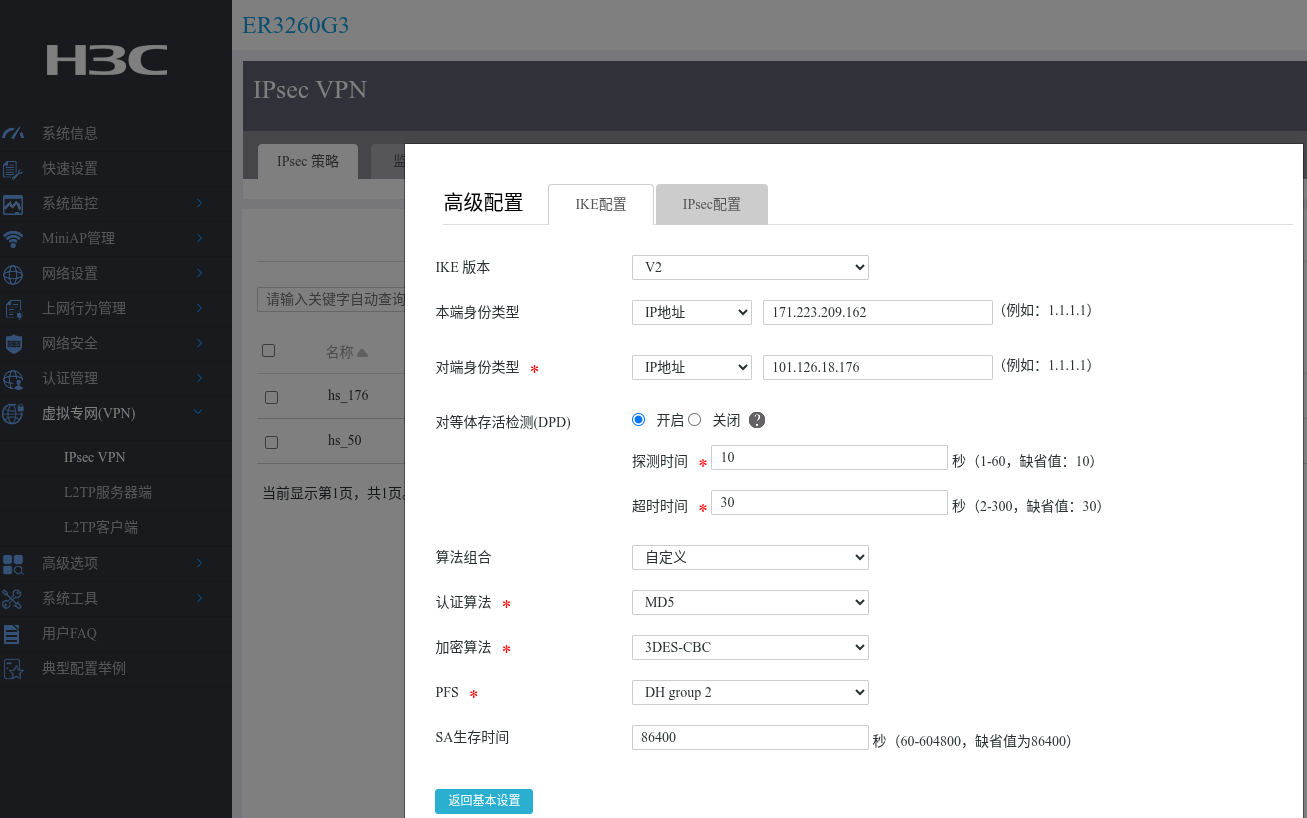
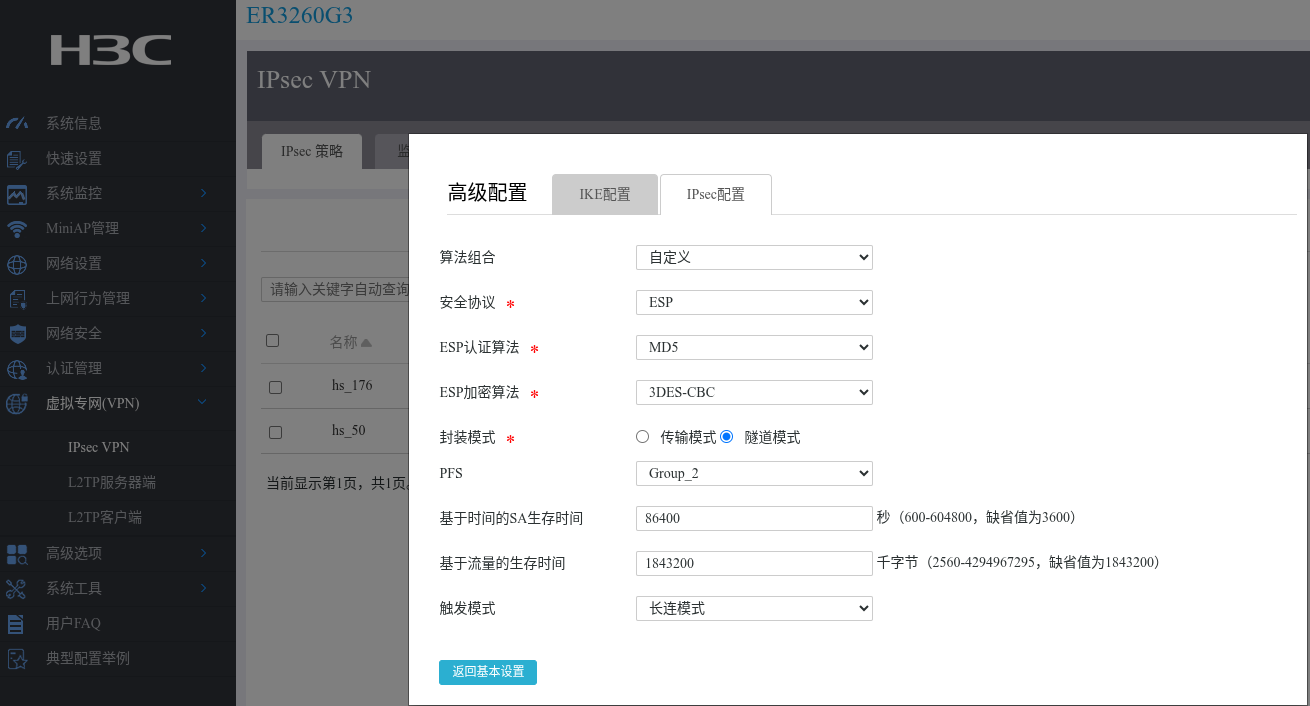
二、 服务器配置:使用预共享密钥(PSK)
1. 增加服务器虚拟ip
centos
新增网卡配置文件(ip a 查看网卡名字:eth0)
vim /etc/sysconfig/network-scripts/ifcfg-eth0:1

DEVICE=eth0:1
BOOTPROTO=static
IPADDR=10.10.10.2
NETMASK=255.255.255.0
ONBOOT=yes
TYPE=Ethernet
NM_CONTROLLED=no
启动配置
ifup eth0:1
2. 服务器ipsec配置
服务器(101.126.18.176)
- 云服务器nat网络
- 内网ip 172.31.16.3
- 虚拟ip 10.10.10.2
增加配置文件
vim /etc/ipsec.d/cd.conf

conn to-cd
    authby=secret
    type=tunnel
    left=172.31.16.3
    leftid=101.126.18.176
    leftsubnet=10.10.10.2/32
    leftnexthop=%defaultroute
    right=171.223.209.162
    rightid=171.223.209.162
    rightsubnet=192.168.2.0/24

    ikev2=insist
    ike=3des-md5;modp1024
    ikelifetime=86400s
    esp=3des-md5-modp1024
    salifetime=86400s

    dpddelay=10s
    dpdtimeout=30s
    dpdaction=restart
    auto=start
    forceencaps=yes
    rekey=yes
    keyingtries=%forever
    fragmentation=yes
3. 配置 /etc/ipsec.d/cd.secrets
两端都添加相同的密钥(注意IP顺序要与ipsec.conf一致):
101.126.18.176 171.223.209.162 : PSK "x7Kj9mQp2NvB4WrT8YzF6LdH3SaE1RuC"
密钥生成建议:
# 生成强密码
openssl rand -base64 32
# 输出类似:x7Kj9mQp2NvB4WrT8YzF6LdH3SaE1RuC
4. 开放端口:
# CentOS/RHEL
firewall-cmd --permanent --add-port=500/udp
firewall-cmd --permanent --add-port=4500/udp
firewall-cmd --permanent --add-masquerade
firewall-cmd --reload

# Ubuntu/Debian
ufw allow 500/udp
ufw allow 4500/udp
# 并确保 /etc/sysctl.conf 中:
net.ipv4.ip_forward=1
net.ipv4.conf.all.send_redirects = 0
net.ipv4.conf.default.send_redirects = 0
net.ipv4.conf.eth0.send_redirects = 0
net.ipv4.conf.all.accept_redirects = 0
net.ipv4.conf.default.accept_redirects = 0
net.ipv4.conf.eth0.accept_redirects = 0

sysctl -p
三、启动和验证
# 启动服务
systemctl start ipsec
systemctl enable ipsec

# 手动启动连接
ipsec auto --up site-to-site

# 查看连接状态
ipsec status
# 或查看详细连接
ipsec whack --status | grep site-to-site

# 查看流量
ipsec whack --trafficstatus

# 测试内网连通(在左侧服务器上)
ping -I 192.168.2.1 172.31.16.1  # 使用内网IP ping对端网关

# 加载所有配置
ipsec auto --rereadall